# install.packages("moments")
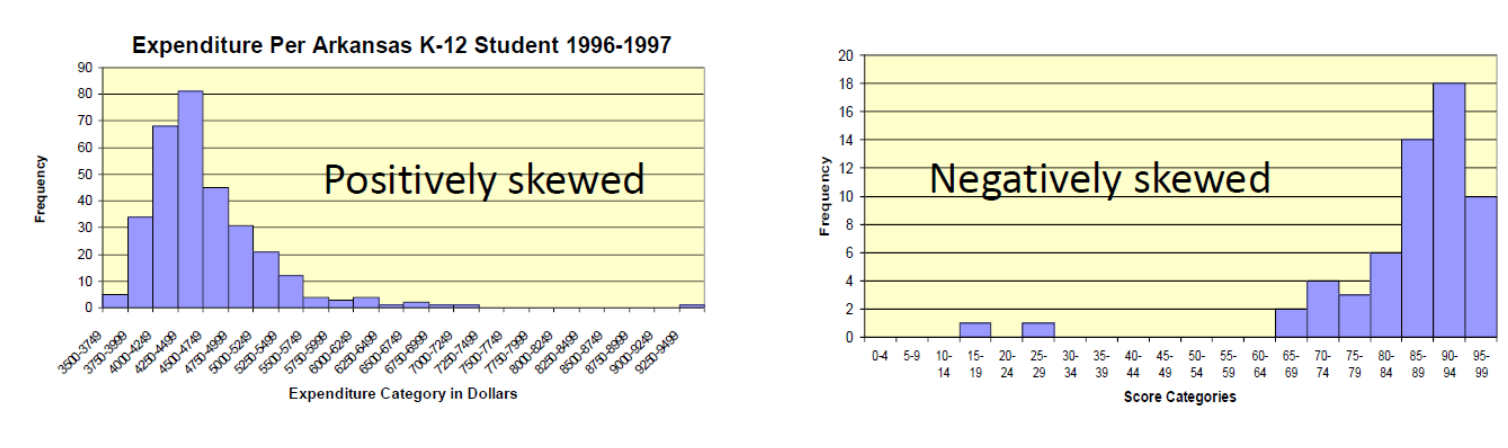
moments::skewness(c(1:10, 100))[1] 2.793716
moments::skewness(rnorm(100, 0, 1)) # should be close to 0[1] -0.1416608
Experimental Design in Education
Jihong Zhang*, Ph.D
Educational Statistics and Research Methods (ESRM) Program*
University of Arkansas
August 18, 2025
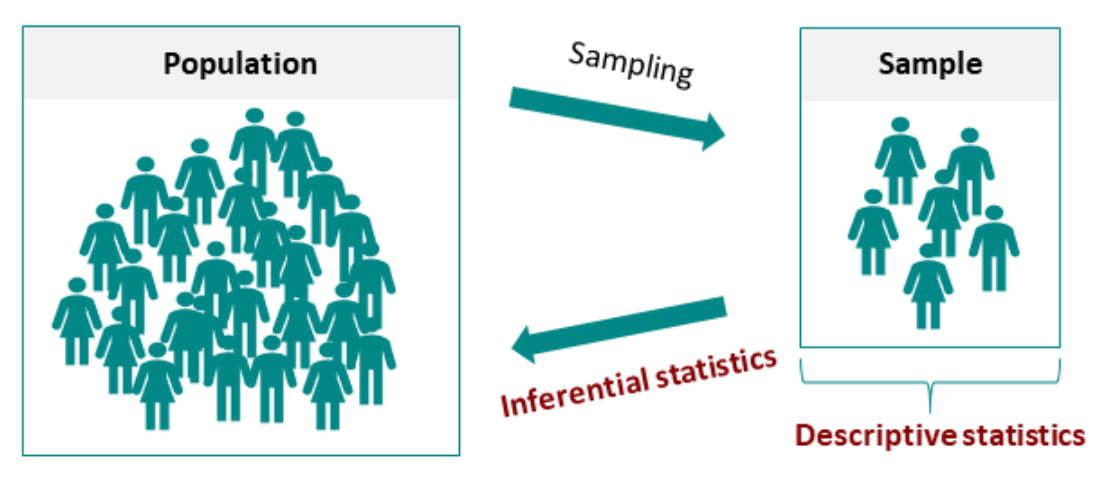
Statistics can be classified by purpose:
[1] 2.793716
[1] -0.1416608
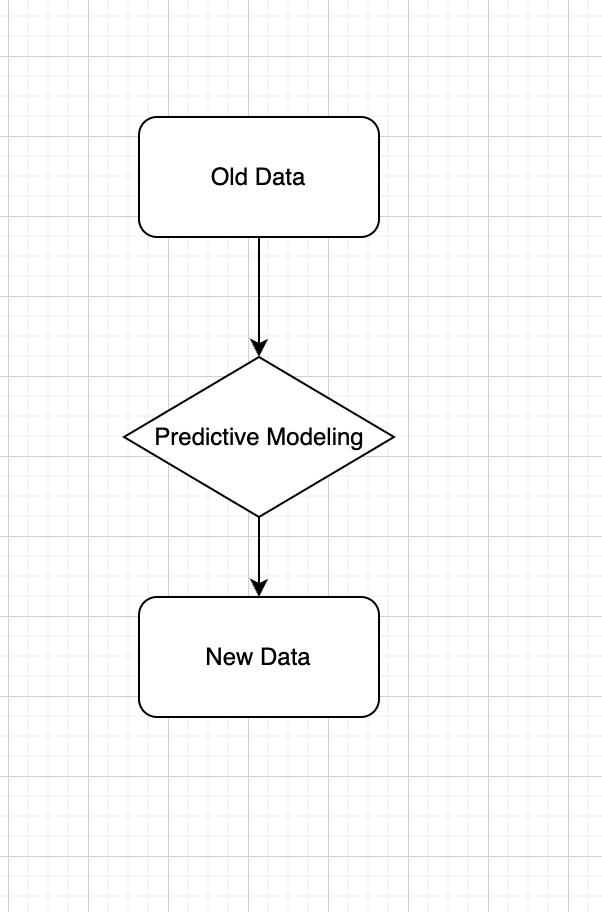
Definition: Use observed data to produce the most accurate prediction possible for new data. Here, the primary goal is that the predicted values have the highest possible fidelity to the true value of the new data.
Example: A simple example would be for a book buyer to predict how many copies of a particular book should be shipped to their store for the next month.
How many houses burned in California wildfire in the first week?
Which factor is most important causing the fires?
How likely the California wildfire will not happen again in next 5 years?
How likely human will live on Mars?
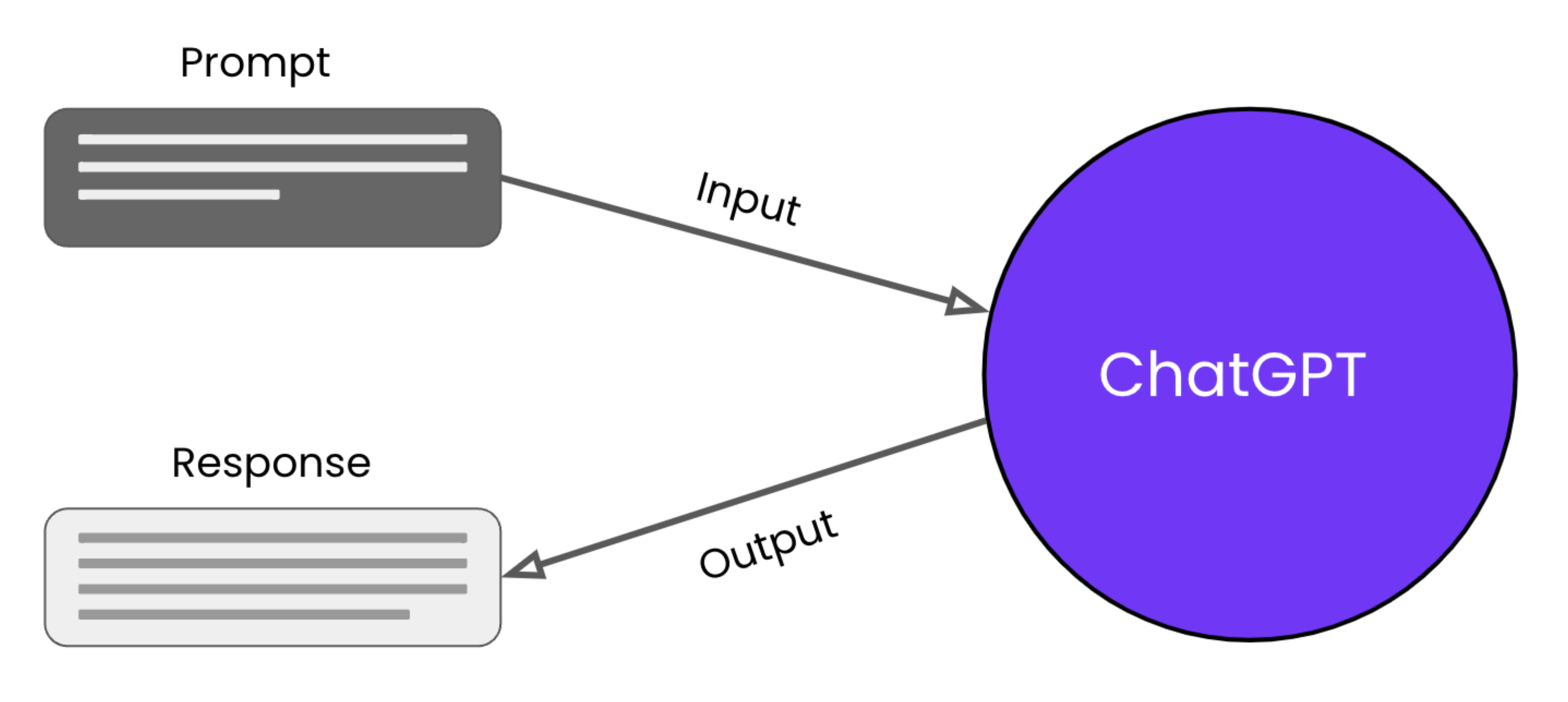
Which type of statistics is used by ChatGPT?
Steps for Inferential Statistical Testing:
One-Way ANOVA
Purpose: Tests one factor with three or more levels on a continuous outcome.
Use Case: Comparing means across multiple groups (e.g., diet types on weight loss).
Two-Way ANOVA
Purpose: Examines two factors and their interaction on a continuous outcome.
Use Case: Studying effects of diet and exercise on weight loss.
Repeated Measures ANOVA
Purpose: Tests the same subjects under different conditions or time points.
Use Case: Longitudinal studies measuring the same outcome over time (e.g., cognitive tests after varying sleep durations).
Mixed-Design ANOVA
Purpose: Combines between-subjects and within-subjects factors in one analysis.
Use Case: Evaluating treatment effects over time with control and experimental groups.
Multivariate Analysis of Variance (MANOVA)
Purpose: Assesses multiple continuous outcomes (dependent variables) influenced by independent variables.
Use Case: Impact of psychological interventions on anxiety, stress, and self-esteem.
party: Political affiliationscores: Attitude scores for survey respondents party scores
1 Democrat 4
2 Democrat 3
3 Democrat 5
4 Democrat 4
5 Democrat 4
6 Republican 6
7 Republican 5
8 Republican 3
9 Republican 7
10 Republican 4
11 Republican 5
12 Independent 8
13 Independent 9
14 Independent 8
15 Independent 7
16 Independent 8
Calculate mean, standard deviation, and variance for each political group
Grand mean across all groups: 5.625
[1] 5.625
# A tibble: 3 × 5
party Mean SD Vars N
<fct> <dbl> <dbl> <dbl> <int>
1 Democrat 4 0.71 0.5 5
2 Republican 5 1.41 2 6
3 Independent 8 0.71 0.5 5
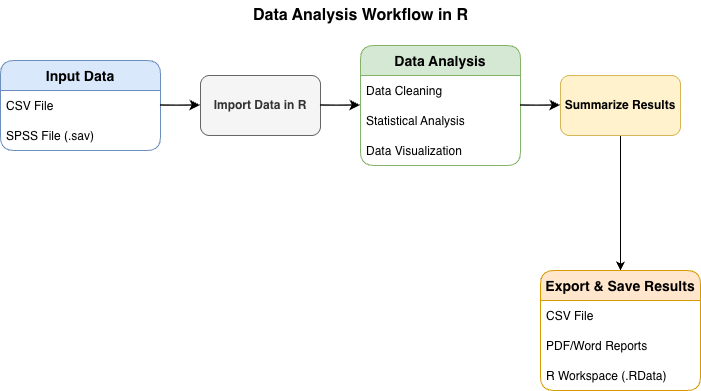
In research, we often need to compute descriptive statistics for multiple continuous variables simultaneously. Here are several approaches:
# Generate simulated student performance data
set.seed(2025)
n_students <- 100
student_data <- data.frame(
student_id = 1:n_students,
math_score = rnorm(n_students, mean = 75, sd = 12),
reading_score = rnorm(n_students, mean = 78, sd = 10),
science_score = rnorm(n_students, mean = 72, sd = 11),
study_hours = rgamma(n_students, shape = 2, scale = 3),
attendance_rate = rbeta(n_students, shape1 = 8, shape2 = 2) * 100
)sapply()# Select only continuous variables
continuous_vars <- student_data[, c("math_score", "reading_score", "science_score", "study_hours", "attendance_rate")]
# Compute mean, sd, and range for each variable
desc_stats <- data.frame(
Mean = sapply(continuous_vars, mean),
SD = sapply(continuous_vars, sd),
Min = sapply(continuous_vars, min),
Max = sapply(continuous_vars, max),
Range = sapply(continuous_vars, function(x) max(x) - min(x))
)
round(desc_stats, 2) Mean SD Min Max Range
math_score 74.94 12.24 45.59 109.23 63.64
reading_score 78.09 9.65 58.84 100.50 41.66
science_score 72.10 10.83 40.66 99.39 58.73
study_hours 6.03 4.81 0.40 26.14 25.74
attendance_rate 80.53 10.53 49.08 99.10 50.02
dplyr package with across()library(dplyr)
student_data |>
summarise(
across(
c(math_score, reading_score, science_score, study_hours, attendance_rate),
list(
Mean = ~mean(.x),
SD = ~sd(.x),
Min = ~min(.x),
Max = ~max(.x),
Range = ~max(.x) - min(.x)
),
.names = "{.col}_{.fn}"
)
) |>
tidyr::pivot_longer(
everything(),
names_to = c("Variable", "Statistic"),
names_sep = "_(?=[^_]+$)",
values_to = "Value"
) |>
tidyr::pivot_wider(
names_from = Statistic,
values_from = Value
) |>
mutate(across(where(is.numeric), ~round(.x, 2)))# A tibble: 5 × 6
Variable Mean SD Min Max Range
<chr> <dbl> <dbl> <dbl> <dbl> <dbl>
1 math_score 74.9 12.2 45.6 109. 63.6
2 reading_score 78.1 9.65 58.8 100. 41.7
3 science_score 72.1 10.8 40.7 99.4 58.7
4 study_hours 6.03 4.81 0.4 26.1 25.7
5 attendance_rate 80.5 10.5 49.1 99.1 50.0
psych::describe()The psych package provides a comprehensive describe() function:
n mean sd min max range
math_score 100 74.94 12.24 45.59 109.23 63.64
reading_score 100 78.09 9.65 58.84 100.50 41.66
science_score 100 72.10 10.83 40.66 99.39 58.73
study_hours 100 6.03 4.81 0.40 26.14 25.74
attendance_rate 100 80.53 10.53 49.08 99.10 50.02
You can also compute descriptives by groups:
# Compute descriptives by program
student_data |>
group_by(program) |>
summarise(
N = n(),
Math_Mean = mean(math_score),
Math_SD = sd(math_score),
Reading_Mean = mean(reading_score),
Reading_SD = sd(reading_score),
Science_Mean = mean(science_score),
Science_SD = sd(science_score)
) |>
mutate(across(where(is.numeric) & !N, ~round(.x, 2)))# A tibble: 3 × 8
program N Math_Mean Math_SD Reading_Mean Reading_SD Science_Mean
<chr> <int> <dbl> <dbl> <dbl> <dbl> <dbl>
1 Arts 30 74.2 12.7 80.5 10.1 72.8
2 STEM 44 74.3 12.4 77.6 9.1 73.4
3 Social Sciences 26 76.9 11.7 76.1 9.8 69.2
# ℹ 1 more variable: Science_SD <dbl>
remotes::install_github("JihongZ/ESRM64103")
library(ESRM64103)
library(dplyr)
exp_political_attitude
exp_political_attitude$party <- factor(exp_political_attitude$party,
levels = c("Democrat", "Republican", "Independent"))
mean_byGroup <- exp_political_attitude |>
group_by(party) |>
summarise(Mean = mean(scores),
SD = round(sd(scores), 2),
Vars = round(var(scores), 2),
N = n())
mean_byGroup
anova_model <- lm(scores ~ party, data = exp_political_attitude)
anova(anova_model)State the null hypothesis and alternative hypothesis:
Set the significant alpha = 0.05
Calculate Observed F-statistics:
F_{obs} = \frac{SS_b/df_b}{SS_w/df_w}
Degrees of freedom: df_b = 3 (groups) - 1 = 2, df_w = 16 (samples) - 3 (groups) = 13
Between-group sum of squares: SS_b = \sum_{j=1}^{g} n_j(\bar{Y}_j - \bar{Y})^2 = 43.75 where n_j is group sample size, \bar{Y}_j is group mean, and \bar{Y} is the grand mean.
Within-group sum of squares: SS_w = \sum_{j=1}^{3} \sum_{i=1}^{n_j}(Y_{ij}-\bar{Y}_j)^2 = 14.00 where Y_{ij} is individual i’s score in group j.
Between-group Sum of Squares: 43.75
Within-group Sum of Squares: 14
Analysis of Variance Table
Response: scores
Df Sum Sq Mean Sq F value Pr(>F)
party 2 43.75 21.8750 20.312 9.994e-05 ***
Residuals 13 14.00 1.0769
---
Signif. codes: 0 '***' 0.001 '**' 0.01 '*' 0.05 '.' 0.1 ' ' 1
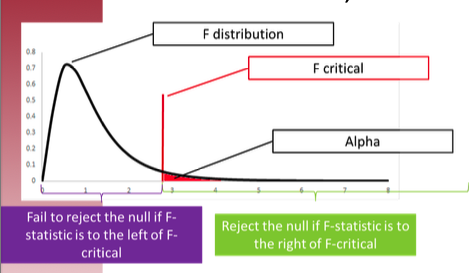
Results show rejection of H_0 (F_{obs} > F_{critical})
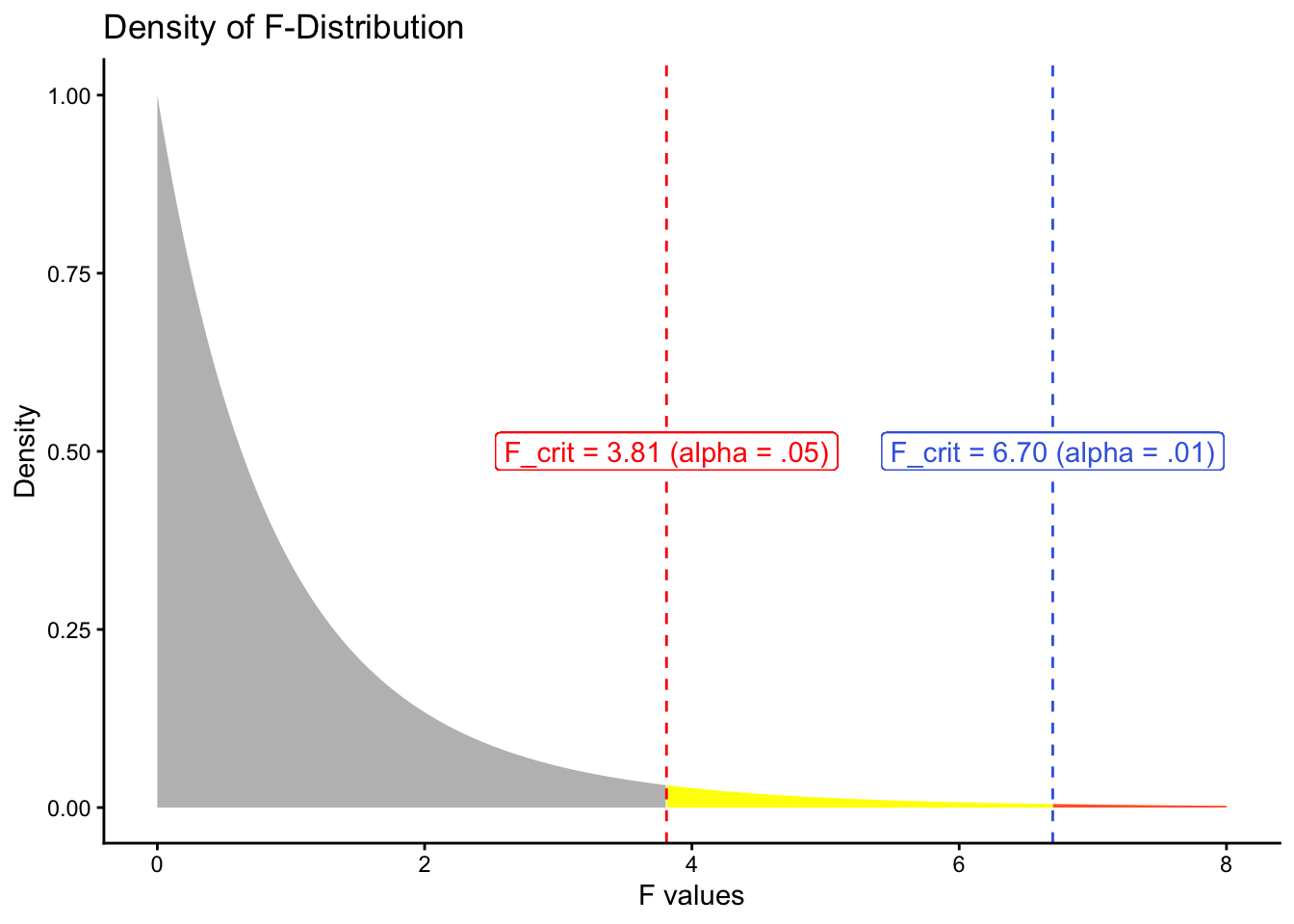
F-statistic has two degree of freedoms (df = 2). This is the density distribution of F-statistics for degree of freedoms as 2 and 13.
# Set degrees of freedom for the numerator and denominator
num_df <- 2 # Change this as per your specification
den_df <- 13 # Change this as per your specification
# Generate a sequence of F values
f_values <- seq(0, 8, length.out = 1000)
# Calculate the density of the F-distribution
f_density <- df(f_values, df1 = num_df, df2 = den_df)
# Create a data frame for plotting
data_to_plot <- data.frame(F_Values = f_values, Density = f_density)
data_to_plot$Reject05 <- data_to_plot$F_Values > 3.81
data_to_plot$Reject01 <- data_to_plot$F_Values > 6.70
# Plot the density using ggplot2
ggplot(data_to_plot) +
geom_area(aes(x = F_Values, y = Density), fill = "grey",
data = filter(data_to_plot, !Reject05)) + # Draw the line
geom_area(aes(x = F_Values, y = Density), fill = "yellow",
data = filter(data_to_plot, Reject05)) + # Draw the line
geom_area(aes(x = F_Values, y = Density), fill = "tomato",
data = filter(data_to_plot, Reject01)) + # Draw the line
geom_vline(xintercept = 3.81, linetype = "dashed", color = "red") +
geom_label(label = "F_crit = 3.81 (alpha = .05)", x = 3.81, y = .5, color = "red") +
geom_vline(xintercept = 6.70, linetype = "dashed", color = "royalblue") +
geom_label(label = "F_crit = 6.70 (alpha = .01)", x = 6.70, y = .5, color = "royalblue") +
ggtitle("Density of F-Distribution") +
xlab("F values") +
ylab("Density") +
theme_classic()Set the alpha \alpha (i.e., type I error rate)—rejection rate vs. p-value
Alpha determines several values for statistical hypothesis testing: the critical value of the test statistics, the rejection region, etc.
Large sample sizes typically use lower alpha levels: .01 or .001 (more restrictive rejection rate)
When we conduct hypothesis testing, four possible outcomes can occur:
| Reality | ||
| Decision | H_0 is true | H_0 is false |
| Fail to reject H_0 | Correct Decision | Error made. Type II error (\beta). |
| Reject H_0 | Error made. Type I error (\alpha) |
Correct Decision (Power) |
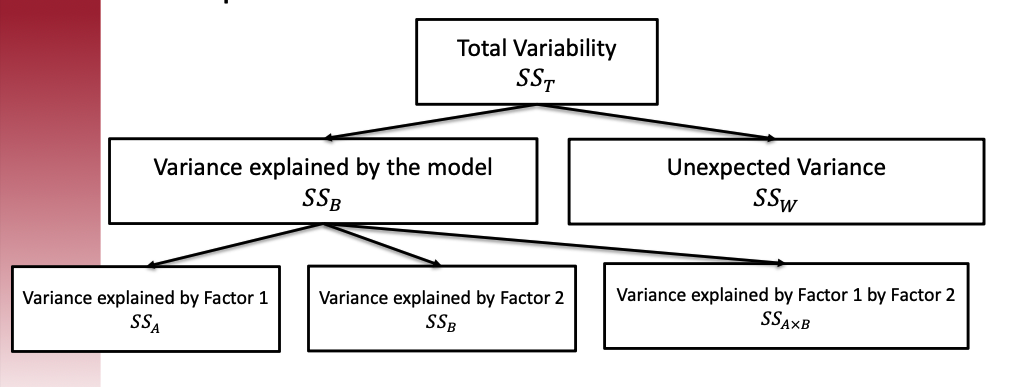
Investigate where the variability in the outcome comes from.
In this study: Do people’s attitude scores differ because of their political party affiliation?
When we have factors influencing the outcome, the total variability can be decomposed as follows:
Core idea: Comparing the variances between groups and within groups to ascertain if the means of different groups are significantly different from each other.
Logic: If the between-group variance (due to systematic differences caused by the independent variable) is significantly greater than the within-group variance (attributable to random error), the observed differences between group means are likely not due to chance.
F-statistics formula for one-way ANOVA:
F_{obs} = \frac{SS_{between}/df_{between}}{SS_{within}/df_{within}}
A one-way ANOVA was conducted to compare the level of concern for tax reform among three political groups: Democrats, Republicans, and Independents. There was a significant effect of political affiliation on tax reform concern at the p < .001 level for the three conditions [F(2, 13) = 20.31, p < .001]. This result indicates significant differences in attitudes toward tax reform among the groups.
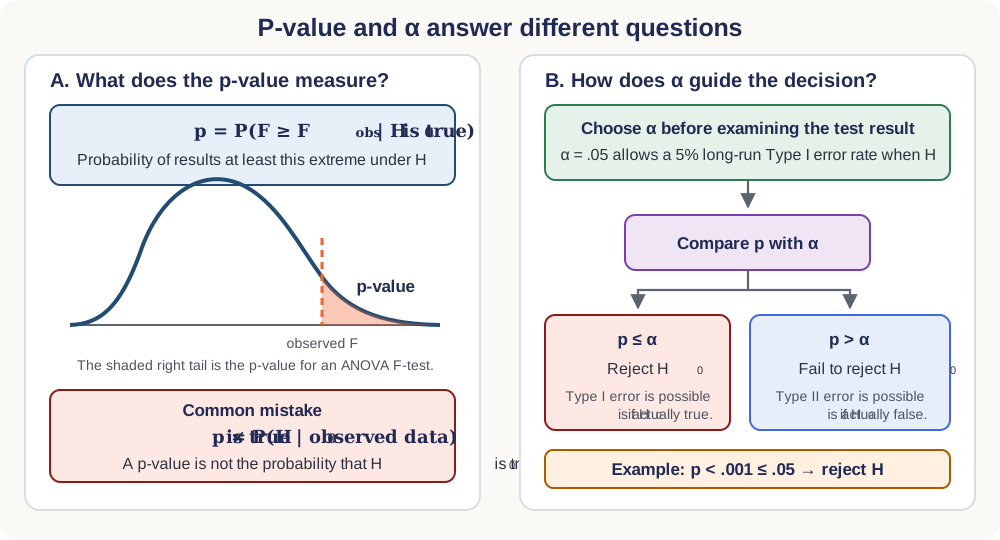
P-values: The probability of observing data as extreme as, or more extreme than, the data observed under the assumption that the null hypothesis is true.
The lower the p-value, the less likely we would see the observed data given the null hypothesis is true
Question: Given that we already have the observed data, does a lower p-value mean the null hypothesis is unlikely to be true?
Answer: No. P(\text{observed data} | H_0 = \text{true}) \neq P(H_0 = \text{true} | \text{observed data}). P-values are often misconstrued as the probability that the null hypothesis is true given the observed data. However, this interpretation is incorrect.
Type I error, also known as a “false positive,” occurs when the null hypothesis is incorrectly rejected when it is, in fact, true.
The alpha level \alpha set before conducting a test (commonly \alpha = 0.05) defines the cutoff point for the p-value below which the null hypothesis will be rejected.
A p-value less than the alpha level suggests a low probability that the observed data would occur if the null hypothesis were true. Consequently, rejecting the null hypothesis in this context implies there is a statistically significant difference likely not due to random chance.
If you set up a high alpha level (0.1), you are more likely to have p-value lower than alpha, which means you are more likely reject the null hypothesis that may be true, which means you may make Type 1 error.
If you set up a low alpha level (0.001), you are less likely to have p-value lower than alpha, which means you are more likely retain the null hypothesis that may be false, which means you may make Type 2 error.
Relying solely on p-values to reject the null hypothesis can be problematic for several reasons:
Binary Decision Making: The use of a threshold (e.g., \alpha = 0.05) to determine whether to reject the null hypothesis reduces the complexity of the data to a binary decision. This can oversimplify the interpretation and overlook nuances in the data.
Neglect of Effect Size: P-values do not convey the size or practical importance of an effect. A very small effect can produce a small p-value if the sample size is large enough, leading to rejection of the null hypothesis even when the effect may not be practically significant.
Probability of Extremes Under the Null: Since p-values quantify the extremeness of the observed data under the null hypothesis, they do not address whether similarly extreme data could also occur under alternative hypotheses. This can lead to an overemphasis on the null hypothesis and potentially disregard other plausible explanations for the data.
A study investigates the effect of different sleep durations on the academic performance of university students. Three groups are defined based on nightly sleep duration: Less than 6 hours, 6 to 8 hours, and more than 8 hours.
We can simulate the data
# Set seed for reproducibility
set.seed(42)
# Generate data for three sleep groups
less_than_6_hours <- rnorm(30, mean = 65, sd = 10)
six_to_eight_hours <- rnorm(50, mean = 75, sd = 8)
more_than_8_hours <- rnorm(20, mean = 78, sd = 7)
# Combine data into a single data frame
sleep_data <- data.frame(
Sleep_Group = factor(c(rep("<6 hours", 30), rep("6-8 hours", 50), rep(">8 hours", 20))),
Exam_Score = c(less_than_6_hours, six_to_eight_hours, more_than_8_hours)
)
# View the first few rows of the dataset
head(sleep_data) Sleep_Group Exam_Score
1 <6 hours 78.70958
2 <6 hours 59.35302
3 <6 hours 68.63128
4 <6 hours 71.32863
5 <6 hours 69.04268
6 <6 hours 63.93875
Df Sum Sq Mean Sq F value Pr(>F)
Sleep_Group 2 2411 1205.4 14.15 4.06e-06 ***
Residuals 97 8264 85.2
---
Signif. codes: 0 '***' 0.001 '**' 0.01 '*' 0.05 '.' 0.1 ' ' 1
Groups:
Less than 6 hours: 30 students
6 to 8 hours: 50 students
More than 8 hours: 20 students
Performance Metric: Average exam scores out of 100.
Less than 6 hours: Mean = 65, SD = 10
6 to 8 hours: Mean = 75, SD = 8
More than 8 hours: Mean = 78, SD = 7
Analysis: One-way ANOVA was conducted to compare the average exam scores among the three groups.
Results: F_{observed} = [Calculate from your analysis], p = [Report p-value]
Alpha Level: \alpha = 0.05
P-value Interpretation: Compare your p-value to alpha and interpret the result
Conclusion: Based on the results, what can you conclude about the effect of sleep duration on academic performance?
Due on next Tuesday Noon. Here is the google form link.
---
title: "Lecture 02: Hypothesis Testing"
subtitle: "Experimental Design in Education"
date: "2025-08-18"
execute:
eval: true
echo: true
warning: false
format:
html:
code-tools: true
code-line-numbers: false
code-fold: false
code-summary: 'Click here to see R code'
number-offset: 1
fig.width: 10
fig-align: center
message: false
grid:
sidebar-width: 350px
uark-revealjs:
chalkboard: true
embed-resources: false
code-fold: false
number-sections: true
number-depth: 1
footer: "ESRM 64503"
slide-number: c/t
tbl-colwidths: auto
scrollable: true
output-file: slides-index.html
mermaid:
theme: forest
---
## Presentation Outline
- **Types of Statistics**
- Descriptive: Summarize data (central tendency, variability, shape)
- Inferential: Make population inferences from samples
- Predictive: Make predictions for new data
- **Hypothesis Testing Steps**
1. State $H_0$ and $H_A$
2. Set $\alpha$ level
3. Compute test statistics
4. Conduct test and make decision
- **ANOVA Fundamentals**
- One dependent variable (DV), one independent variable (IV) with multiple levels
- Between-subjects and within-subjects designs
- Interaction effects
- **Test Components**
- Error types (Type I and Type II)
- Variance decomposition ($SS_{Total}$, $SS_{Between}$, $SS_{Within}$)
- F-statistics and critical values
- **Examples**
- Political attitudes study
- Sleep and academic performance study
- **Decision Making**
- Compare $F_{observed}$ vs $F_{critical}$
- Compare p-value vs $\alpha$
- Interpret at $(1-\alpha)$ confidence level
## Types of Statistics
Statistics can be classified by purpose:
1. Descriptive Statistics
2. Inferential Statistics
3. Predictive Statistics
------------------------------------------------------------------------
### 1. Descriptive Statistics
- **Definition**: Describes and summarizes the collected data using numbers/values
- Central tendency: mean, median, mode
- Variability: range, interquartile range (IQR), variance, standard deviation
- Shape of distribution: skewness, kurtosis
```{r}
# install.packages("moments")
moments::skewness(c(1:10, 100))
moments::skewness(rnorm(100, 0, 1)) # should be close to 0
```
------------------------------------------------------------------------
- **Examples** of skewness with two graphs:

------------------------------------------------------------------------
```{r}
#| code-fold: true
#| code-summary: a skewed normal distribution using beta distribution
set.seed(1234)
# Simulate a skewed normal distribution using beta distribution
neg_skewed_data <- rbeta(10000,5,2)
hist(neg_skewed_data, main = "Negative Skewed Distribution")
pos_skewed_data <- rbeta(10000,2,5)
hist(pos_skewed_data, main = "Positive Skewed Distribution")
```
------------------------------------------------------------------------
```{r}
#| code-fold: true
#| code-summary: skewed normal distribution using beta distribution
library(ggplot2)
library(tidyr)
data.frame(
neg = neg_skewed_data,
pos = pos_skewed_data
) |>
pivot_longer(c(neg, pos), names_to = "Type") |>
ggplot(aes(y = value, fill = Type)) +
geom_boxplot() +
scale_fill_discrete(labels = c("Negative Skewed", "Positive Skewed"), name = "")
```
------------------------------------------------------------------------
### 2. Inferential Statistics
- **Definition**: Uses probability theory to infer/estimate population characteristics from a sample using hypothesis testing
- Visual representation shows:
- Population → Sampling → Sample
- Sample → Inference → Population
- Sample is analyzed using descriptive statistics
- Inferential statistics used to make conclusions about population

------------------------------------------------------------------------
### 3. Predictive Statistics
- **Definition**: Use observed data to produce the most accurate prediction possible for new data. Here, the primary goal is that the predicted values have the highest possible fidelity to the true value of the new data.
- **Example**: A simple example would be for a book buyer to predict how many copies of a particular book should be shipped to their store for the next month.
## Which type of statistics to use
1. How many houses burned in California wildfire in the first week?
- [Descriptive]{.heimu}
2. Which factor is most important causing the fires?
- [Inference]{.heimu}
3. How likely the California wildfire will not happen again in next 5 years?
- [Predictive]{.heimu}
4. How likely human will live on Mars?
- [Not statistics. Sci-Fi]{.heimu}
5. Which type of statistics is used by ChatGPT?
{width="500"}
## Statistical Hypothesis Testing Steps
**Steps for Inferential Statistical Testing:**
1. State null hypothesis ($H_0$) and alternative hypothesis ($H_A$)
- Null hypothesis must be some statement that is **statistically testable**.
2. Set alpha α (type I error rate) to determine significance levels
- rejection region vs. p-value
3. Compute test statistics (i.e., F-statistics)
4. Conduct hypothesis testing:
- Compare test statistics: critical value vs. observed value
- Compare alpha and p-value
## ANOVA Introduction
- ANOVA is one of the most frequently used statistical tool for inferential statistics in experimental design.
- Settings for Analysis of Variance (ANOVA):
- One dependent variable (DV), "Outcome"
- One independent variable (IV) with multiple levels, "Group"
- **Example question**: "Are there mean differences in SAT math scores (**outcome**) for different high school program types (**group**)?"
- Course covers advanced ANOVA topics:
- Group comparisons (Group A vs. B vs. C)
- Model comparisons
- Between/within-subject design
- Interaction effects
## Types of ANOVA: Key Differences
- [**One-Way ANOVA**]{.underline}
- **Purpose**: Tests **one** factor with three or more levels on a **continuous** outcome.
- **Use Case**: Comparing means across multiple groups (e.g., diet types on weight loss).
- [**Two-Way ANOVA**]{.underline}
- **Purpose**: Examines **two factors and their interaction** on a **continuous** outcome.
- **Use Case**: Studying effects of diet and exercise on weight loss.
- [**Repeated Measures ANOVA**]{.underline}
- **Purpose**: Tests the same subjects under **different conditions or time points**.
- **Use Case**: Longitudinal studies measuring the same outcome over time (e.g., cognitive tests after varying sleep durations).
- [**Mixed-Design ANOVA**]{.underline}
- **Purpose**: Combines **between-subjects and within-subjects** factors in one analysis.
- **Use Case**: Evaluating treatment effects over time with control and experimental groups.
- [**Multivariate Analysis of Variance (MANOVA)**]{.underline}
- **Purpose**: Assesses **multiple continuous outcomes** (dependent variables) influenced by independent variables.
- **Use Case**: Impact of psychological interventions on anxiety, stress, and self-esteem.
# Example 1: Political Study on Tax Reform Attitudes
## Background
- A political scientist studies tax reform attitudes across political groups:
- **Groups**: Democrats (n=4), Republicans (n=5), Independents (n=8)
- **Outcome measure**: Attitude scores (higher score = greater concern for tax reform)
- **Analysis**: Conducted at $\alpha = .05$
- **Variables**:
- `party`: Political affiliation
- `scores`: Attitude scores for survey respondents
------------------------------------------------------------------------
```{r}
#| eval: false
## Install the package ESRM64103 from GitHub
remotes::install_github("JihongZ/ESRM64103")
```
```{r}
library(ESRM64103)
library(dplyr)
exp_political_attitude
```
## Workflow of data analysis in R

## Descriptive Statistics: Summary Statistics
- Calculate mean, standard deviation, and variance for each political group
- Grand mean across all groups: 5.625
```{r}
# Grand mean
mean(exp_political_attitude$scores)
exp_political_attitude$party <- factor(exp_political_attitude$party,
levels = c("Democrat", "Republican", "Independent"))
mean_byGroup <- exp_political_attitude |>
group_by(party) |>
summarise(Mean = mean(scores),
SD = round(sd(scores), 2),
Vars = round(var(scores), 2),
N = n())
mean_byGroup
```
## Descriptive Statistics: Bar Plot
```{r}
library(ggplot2)
ggplot(data = mean_byGroup) +
geom_bar(mapping = aes(x = party, y = Mean, fill = party), stat = "identity", width = .5) +
geom_label(aes(x = party, y = Mean, label = Mean), nudge_y = .3) +
labs(title = "Attitudes Toward the Tax Return") +
theme(text = element_text(size = 15))
```
------------------------------------------------------------------------
## Descriptive Statistics: Multiple Variables
In research, we often need to compute descriptive statistics for multiple continuous variables simultaneously. Here are several approaches:
```{r}
#| code-fold: true
#| code-summary: "Show data simulation code"
# Generate simulated student performance data
set.seed(2025)
n_students <- 100
student_data <- data.frame(
student_id = 1:n_students,
math_score = rnorm(n_students, mean = 75, sd = 12),
reading_score = rnorm(n_students, mean = 78, sd = 10),
science_score = rnorm(n_students, mean = 72, sd = 11),
study_hours = rgamma(n_students, shape = 2, scale = 3),
attendance_rate = rbeta(n_students, shape1 = 8, shape2 = 2) * 100
)
```
### Method 1: Base R with `sapply()`
```{r}
# Select only continuous variables
continuous_vars <- student_data[, c("math_score", "reading_score", "science_score", "study_hours", "attendance_rate")]
# Compute mean, sd, and range for each variable
desc_stats <- data.frame(
Mean = sapply(continuous_vars, mean),
SD = sapply(continuous_vars, sd),
Min = sapply(continuous_vars, min),
Max = sapply(continuous_vars, max),
Range = sapply(continuous_vars, function(x) max(x) - min(x))
)
round(desc_stats, 2)
```
------------------------------------------------------------------------
### Method 2: Using `dplyr` package with `across()` {visibility="hidden"}
```{r}
library(dplyr)
student_data |>
summarise(
across(
c(math_score, reading_score, science_score, study_hours, attendance_rate),
list(
Mean = ~mean(.x),
SD = ~sd(.x),
Min = ~min(.x),
Max = ~max(.x),
Range = ~max(.x) - min(.x)
),
.names = "{.col}_{.fn}"
)
) |>
tidyr::pivot_longer(
everything(),
names_to = c("Variable", "Statistic"),
names_sep = "_(?=[^_]+$)",
values_to = "Value"
) |>
tidyr::pivot_wider(
names_from = Statistic,
values_from = Value
) |>
mutate(across(where(is.numeric), ~round(.x, 2)))
```
------------------------------------------------------------------------
### Method 3: Using `psych::describe()` {visibility="hidden"}
The `psych` package provides a comprehensive `describe()` function:
```{r}
library(psych)
continuous_vars |>
describe() |>
select(n, mean, sd, min, max, range) |>
round(2)
```
### Grouped Descriptive Statistics
You can also compute descriptives by groups:
```{r}
#| code-fold: true
#| code-summary: "Show grouping variable code"
# Add a grouping variable
student_data$program <- sample(c("STEM", "Arts", "Social Sciences"),
n_students, replace = TRUE,
prob = c(0.4, 0.3, 0.3))
```
```{r}
# Compute descriptives by program
student_data |>
group_by(program) |>
summarise(
N = n(),
Math_Mean = mean(math_score),
Math_SD = sd(math_score),
Reading_Mean = mean(reading_score),
Reading_SD = sd(reading_score),
Science_Mean = mean(science_score),
Science_SD = sd(science_score)
) |>
mutate(across(where(is.numeric) & !N, ~round(.x, 2)))
```
------------------------------------------------------------------------
### Workflow of Example 1
```{r}
#| code-fold: true
#| eval: false
remotes::install_github("JihongZ/ESRM64103")
library(ESRM64103)
library(dplyr)
exp_political_attitude
exp_political_attitude$party <- factor(exp_political_attitude$party,
levels = c("Democrat", "Republican", "Independent"))
mean_byGroup <- exp_political_attitude |>
group_by(party) |>
summarise(Mean = mean(scores),
SD = round(sd(scores), 2),
Vars = round(var(scores), 2),
N = n())
mean_byGroup
anova_model <- lm(scores ~ party, data = exp_political_attitude)
anova(anova_model)
```

## Steps of ANOVA
1. State the null hypothesis and alternative hypothesis:
- $H_0$: $\bar{X}_{dem}$ = $\bar{X}_{rep}$ = $\bar{X}_{ind}$
- $H_A$: At least two groups are significantly different
- Question: Why not testing $\bar{SD}_{dem}$ = $\bar{SD}_{rep}$ = $\bar{SD}_{ind}$?
- Answer: [You definitely can in statistics. Variances homogeneity.]{.heimu}
2. Set the significant alpha = 0.05
3. Calculate Observed F-statistics:
$$
F_{obs} = \frac{SS_b/df_b}{SS_w/df_w}
$$
- Degrees of freedom: $df_b$ = 3 (groups) - 1 = 2, $df_w$ = 16 (samples) - 3 (groups) = 13
- Between-group sum of squares:
$$SS_b = \sum_{j=1}^{g} n_j(\bar{Y}_j - \bar{Y})^2 = 43.75$$
where $n_j$ is group sample size, $\bar{Y}_j$ is group mean, and $\bar{Y}$ is the grand mean.
- Within-group sum of squares:
$$SS_w = \sum_{j=1}^{3} \sum_{i=1}^{n_j}(Y_{ij}-\bar{Y}_j)^2 = 14.00$$
where $Y_{ij}$ is individual $i$'s score in group $j$.
### R code to calcuate F statistics
```{r}
#| eval: true
GrandMean <- mean(exp_political_attitude$scores)
## Between-group Sum of Squares
cat("Between-group Sum of Squares: ", sum(mean_byGroup$N * (mean_byGroup$Mean - GrandMean)^2))
## Within-group Sum of Squares
SSw_dt <- exp_political_attitude |>
group_by(party) |>
mutate(GroupMean = mean(scores),
Diff_sq = (scores - GroupMean)^2)
cat("Within-group Sum of Squares: ", sum(SSw_dt$Diff_sq))
```
```{r}
SS_b <- sum(mean_byGroup$N * (mean_byGroup$Mean - GrandMean)^2)
SS_w <- sum(SSw_dt$Diff_sq)
df_b = 2
df_w = 16 - 3
F_bw = (SS_b / df_b) / (SS_w / df_w)
```
- $F_{critical}$ (df_num = 2, df_deno = 13) = 3.81
- $F_{observed}$ = 20.31
```{r}
anova_model <- lm(scores ~ party, data = exp_political_attitude)
anova(anova_model)
```
Results show rejection of $H_0$ ($F_{obs}$ > $F_{critical}$)
## Step 1: State the null hypothesis and alternative hypothesis
1. Formulate the **null hypothesis** ($H_0$) and the **alternative hypothesis** ($H_A$)
- Prior to any statistical tests, start with a working hypothesis based on an initial guess about the phenomenon.
- Example: Investigating whether political groups affect their attitudes.
- Research question: "Is there a variance in attitude score among different groups?"
- Hypothesis: **"Different political groups will show varied attitudes."**
- Operational Definitions:
- **Null hypothesis** ($H_0$): No observed difference or effect ("Something is something").
- Group A's mean - Group B's mean = 0
- **Alternative hypothesis** ($H_A$): Noticeable difference or effect, contrary to $H_0$ ("Something is not something")
- The adequacy of the data will dictate if $H_0$ can be confidently rejected.
## Step 2: Rejection region (alpha)
F-statistic has two degree of freedoms (df = 2). This is the density distribution of F-statistics for degree of freedoms as 2 and 13.
```{r}
#| code-fold: true
# Set degrees of freedom for the numerator and denominator
num_df <- 2 # Change this as per your specification
den_df <- 13 # Change this as per your specification
# Generate a sequence of F values
f_values <- seq(0, 8, length.out = 1000)
# Calculate the density of the F-distribution
f_density <- df(f_values, df1 = num_df, df2 = den_df)
# Create a data frame for plotting
data_to_plot <- data.frame(F_Values = f_values, Density = f_density)
data_to_plot$Reject05 <- data_to_plot$F_Values > 3.81
data_to_plot$Reject01 <- data_to_plot$F_Values > 6.70
# Plot the density using ggplot2
ggplot(data_to_plot) +
geom_area(aes(x = F_Values, y = Density), fill = "grey",
data = filter(data_to_plot, !Reject05)) + # Draw the line
geom_area(aes(x = F_Values, y = Density), fill = "yellow",
data = filter(data_to_plot, Reject05)) + # Draw the line
geom_area(aes(x = F_Values, y = Density), fill = "tomato",
data = filter(data_to_plot, Reject01)) + # Draw the line
geom_vline(xintercept = 3.81, linetype = "dashed", color = "red") +
geom_label(label = "F_crit = 3.81 (alpha = .05)", x = 3.81, y = .5, color = "red") +
geom_vline(xintercept = 6.70, linetype = "dashed", color = "royalblue") +
geom_label(label = "F_crit = 6.70 (alpha = .01)", x = 6.70, y = .5, color = "royalblue") +
ggtitle("Density of F-Distribution") +
xlab("F values") +
ylab("Density") +
theme_classic()
```
------------------------------------------------------------------------
1. Set the alpha $\alpha$ (i.e., type I error rate)—rejection rate vs. p-value
- Alpha determines several values for statistical hypothesis testing: the critical value of the test statistics, the rejection region, etc.
- Large sample sizes typically use lower alpha levels: .01 or .001 (more restrictive rejection rate)
2. When we conduct hypothesis testing, four possible outcomes can occur:
+----------------------+-------------------------+--------------------------+
| | **Reality** | |
+----------------------+-------------------------+--------------------------+
| **Decision** | $H_0$ is true | $H_0$ is false |
+----------------------+-------------------------+--------------------------+
| Fail to reject $H_0$ | Correct Decision | Error made. |
| | | |
| | | Type II error ($\beta$). |
+----------------------+-------------------------+--------------------------+
| Reject $H_0$ | Error made. | Correct Decision (Power) |
| | | |
| | Type I error ($\alpha$) | |
+----------------------+-------------------------+--------------------------+
: Type I & II Error
## Step 3: Compute the test statistics
- Investigate where the variability in the outcome comes from.
- In this study: Do people's attitude scores differ because of their political party affiliation?
- When we have factors influencing the outcome, the total variability can be decomposed as follows:
------------------------------------------------------------------------
### F-statistics
- **Core idea**: Comparing the variances between groups and within groups to ascertain if the means of different groups are significantly different from each other.
- **Logic**: If the **between-group variance** (due to systematic differences caused by the independent variable) is significantly greater than the **within-group variance** (attributable to random error), the observed differences between group means are likely not due to chance.
- **F-statistics formula for one-way ANOVA:**
$$
F_{obs} = \frac{SS_{between}/df_{between}}{SS_{within}/df_{within}}
$$
- Degrees of freedom: $df_{between}$ = 3 (groups) - 1 = 2, $df_{within}$ = 16 (samples) - 3 (groups) = 13
- $SS_{between}$ = $\sum n_j(\bar{Y}_j - \bar{Y})^2$ = 43.75
- Variability in the differences between groups (weighted by group sample size)
- $SS_{within}$ = $\sum_{j=1}^{3} \sum_{i=1}^{n_j}(Y_{ij}-\bar{Y}_j)^2$ = 14.00; where $Y_{ij}$ is individual $i$'s score in group $j$
- Random error within groups—individuals differ in attitudes for unknown reasons
## Step 4: Conduct a hypothesis testing
- In addition to the comparison of the critical value and the observed value of the test statistics, we can also compare the alpha and the p-value:

- We determine $F_{crit}$ by setting $\alpha$ value.
- $\alpha$ = (acceptable) type I error rate = probability that we wrongly reject $H_0$ when $H_0$ is true
- From the data, we obtain $F_{obs}$ with p-value.
- p-value = probability of datasets having F-statistics larger than $F_{obs}$
- If the F statistic from the data ($F_{obs}$) is larger than $F_{critical}$, then you are in the rejection region and can reject $H_0$ and accept $H_A$ with $(1-\alpha)$ level of confidence.
- If the p-value obtained from the ANOVA is less than $\alpha$, then reject $H_0$ and accept $H_A$ with $(1-\alpha)$ level of confidence.
## Step 5: Results Report
A one-way ANOVA was conducted to compare the level of concern for tax reform among three political groups: Democrats, Republicans, and Independents. There was a significant effect of political affiliation on tax reform concern at the $p < .001$ level for the three conditions [$F(2, 13) = 20.31$, $p < .001$]. This result indicates significant differences in attitudes toward tax reform among the groups.
-------------------
## Limitation of ANOVA
<iframe src="https://www.linkedin.com/embed/feed/update/urn:li:share:7422207333860130818" height="1194" width="504" frameborder="0" allowfullscreen="" title="Embedded post"></iframe>
-------------------
## Note: Relationship Between P-values and Type I Error
1. **P-values**: The probability of observing data as extreme as, or more extreme than, the data observed **under the assumption that the null hypothesis is true**.
- The lower the p-value, the less likely we would see the observed data given the null hypothesis is true
- **Question**: Given that we already have the observed data, does a lower p-value mean the null hypothesis is unlikely to be true?
- **Answer**: No. $P(\text{observed data} | H_0 = \text{true}) \neq P(H_0 = \text{true} | \text{observed data})$. P-values are often misconstrued as the probability that the null hypothesis is true given the observed data. However, this interpretation is incorrect.
2. **Type I error**, also known as a "false positive," occurs when the null hypothesis is incorrectly rejected when it is, in fact, true.
3. The alpha level $\alpha$ set before conducting a test (commonly $\alpha = 0.05$) defines the cutoff point for the p-value below which the null hypothesis will be rejected.
- A p-value less than the alpha level suggests a low probability that the observed data would occur if the null hypothesis were true. Consequently, rejecting the null hypothesis in this context implies there is a statistically significant difference likely not due to random chance.
- If you set up a high alpha level (0.1), you are more likely to have p-value lower than alpha, which means you are more likely reject the null hypothesis that may be true, which means you may make Type 1 error.
- If you set up a low alpha level (0.001), you are less likely to have p-value lower than alpha, which means you are more likely retain the null hypothesis that may be false, which means you may make Type 2 error.
## Note: Limitations of p-values
Relying solely on p-values to reject the null hypothesis can be problematic for several reasons:
- **Binary Decision Making**: The use of a threshold (e.g., $\alpha = 0.05$) to determine whether to reject the null hypothesis reduces the complexity of the data to a binary decision. This can oversimplify the interpretation and overlook nuances in the data.
- **Alternatives**: Confidence intervals, Bayesian statistics (reporting posterior distributions)
- **Neglect of Effect Size**: P-values do not convey the size or practical importance of an effect. A very small effect can produce a small p-value if the sample size is large enough, leading to rejection of the null hypothesis even when the effect may not be practically significant.
- **Solution**: Report effect sizes that are independent of sample size
- **Probability of Extremes Under the Null**: Since p-values quantify the extremeness of the observed data under the null hypothesis, they do not address whether similarly extreme data could also occur under alternative hypotheses. This can lead to an overemphasis on the null hypothesis and potentially disregard other plausible explanations for the data.
- **Solution**: Explore theory, find alternative explanations, try varied models
## A short quiz
[Google form link](https://forms.gle/6Tgu1H3Y8Vttmqep6)
# Example 2: the Effect of Sleep on Academic Performance (Simulation)
## Background
- A study investigates the effect of different sleep durations on the academic performance of university students. Three groups are defined based on nightly sleep duration: Less than 6 hours, 6 to 8 hours, and more than 8 hours.
- We can simulate the data
```{r}
#| eval: true
# Set seed for reproducibility
set.seed(42)
# Generate data for three sleep groups
less_than_6_hours <- rnorm(30, mean = 65, sd = 10)
six_to_eight_hours <- rnorm(50, mean = 75, sd = 8)
more_than_8_hours <- rnorm(20, mean = 78, sd = 7)
# Combine data into a single data frame
sleep_data <- data.frame(
Sleep_Group = factor(c(rep("<6 hours", 30), rep("6-8 hours", 50), rep(">8 hours", 20))),
Exam_Score = c(less_than_6_hours, six_to_eight_hours, more_than_8_hours)
)
# View the first few rows of the dataset
head(sleep_data)
```
### Method: R function
```{r}
#| eval: true
## There are two columns: (1) Sleep_Group (Group variable, IV) (2) Exam_Score (Outcome, DV)
mod <- lm(Exam_Score ~ Sleep_Group, data = sleep_data)
mod_aov <- aov(mod)
anova(mod)
summary(mod_aov) # F-value = 14.15, p < .05
```
### Method: Manual coding
```{r}
GrandMean <- mean(sleep_data$Exam_Score) ## grand mean of score
library(dplyr) # R package that can perform group_by and |>
mean_byGroup <- sleep_data |>
group_by(Sleep_Group) |>
summarise(
N = n(),
Mean = mean(Exam_Score)
)
## between-group sum of square
SS_b <- sum(mean_byGroup$N * (mean_byGroup$Mean - GrandMean)^2)
## within-group sum of square
SSw_dt <- sleep_data |>
group_by(Sleep_Group) |>
mutate(GroupMean = mean(Exam_Score),
Diff_sq = (Exam_Score - GroupMean)^2)
SS_w <- sum(SSw_dt$Diff_sq)
df_b = 2 # between-group degree of freedom
df_w = 100 - 3 # with-group
F_bw = (SS_b / df_b) / (SS_w / df_w)
SS_b + SS_w
```
## Descriptive Statistics
- **Groups**:
- **Less than 6 hours**: 30 students
- **6 to 8 hours**: 50 students
- **More than 8 hours**: 20 students
- **Performance Metric**: Average exam scores out of 100.
- **Less than 6 hours**: Mean = 65, SD = 10
- **6 to 8 hours**: Mean = 75, SD = 8
- **More than 8 hours**: Mean = 78, SD = 7
## Your Turn:
#### F-test
- **Analysis**: One-way ANOVA was conducted to compare the average exam scores among the three groups.
- **Results**: $F_{observed}$ = _[Calculate from your analysis]_, $p$ = _[Report p-value]_
#### Interpretation
- **Alpha Level**: $\alpha = 0.05$
- **P-value Interpretation**: [Compare your p-value to alpha and interpret the result]{.heimu}
- **Conclusion**: [Based on the results, what can you conclude about the effect of sleep duration on academic performance?]{.heimu}
## Homework 1
Due on next Tuesday Noon. Here is the [google form link](https://forms.gle/9RoxJe9GeCFncp5S9).